On-Camera Coaching for Executives: A Practical Guide
%20(1)%201.png)
.png)
.png)
August 31, 2026
%20(1).jpg)

A headshot retouching policy is the documented rulebook that governs how employee and executive photos get edited, approved, and delivered, so every portrait across a company looks like it belongs to the same brand. It combines a written visual standard, defined retouching limits, and an approval workflow with named roles. Get those three pieces right and you get consistent galleries, faster sign-offs, and fewer disputes over how someone looks in a photo. Providers like studio2U build these policies directly into their production process rather than leaving them to chance.
TL;DR:
- A headshot retouching policy must clearly define visual standards, retouching limits, and approval workflows to ensure consistency across all portraits.
- Exact specifications for background color, crop ratio, lighting, and expression are essential to prevent mismatched results from different photographers.
- Retouching rules should specify what edits are allowed, limited, or forbidden, with clear approval processes for exceptions and sensitive changes.
- An approved file naming convention, proper formats, and regular audits help maintain quality and uniformity over time.
- Policy ownership by marketing or HR and quarterly reviews prevent visual drift and ensure portraits remain aligned with brand standards.
A workable policy fits on a page or two, and it needs six components to function. Skip one, and you’ll end up refereeing disputes that a written standard would have prevented.
A one-page headshot guideline covering visual standards, submission rules, review workflow, and update cadence is the fastest way to roll out a program that doesn’t require constant babysitting. Without that structure, you end up collecting mismatched photos from five different vendors, and the team page ends up looking like it belongs to five different companies stitched together.
Vague guidance produces inconsistent results. “Professional background” means something different to every photographer; “#F2F2F2 seamless gray, no texture” means the same thing to all of them.
Background. Specify an exact hex value, not a color name. Solid white (#FFFFFF) photographs cleanly against most website templates, but a light gray (#E8E8E8 or similar) hides sensor noise better on lower-end cameras. Note the material too: matte paper avoids the sheen that vinyl backdrops throw under studio strobes.
Crop and framing. Set a standard aspect ratio, usually 1:1 for directories and 4:5 for LinkedIn-style profiles. Eyes should sit roughly at the upper third of the frame, with consistent headroom above the head so a batch of fifty photos crops identically into a grid.
Focal length and lighting. An 80–120mm equivalent focal length flattens facial features less than a wide lens, which matters when the same portrait appears in a directory and on a stage backdrop. Key light at 45 degrees, a visible catchlight in each eye, and shadow density that reads as “soft,” not “dramatic.”

Expression and attire. Leadership portraits often carry a slightly more formal expression standard than staff photos; document the acceptable range in writing rather than leaving it to the photographer’s judgment, especially for attire guidance across departments.
Pro Tip: Photograph one internal “reference” employee under your exact spec before the first shoot day. That single image becomes the calibration target every retoucher and photographer checks against.
Retouching rules need to be specific enough that a freelance editor and an in-house designer produce the same output from the same raw file.
A defined retouching workflow with consistent steps keeps quality uniform across a large team instead of drifting editor to editor. For executive-level portraits or anything flagged as an exception, require the retoucher to submit a side-by-side before/after image along with a short change log describing what was adjusted and at what level.
Pro Tip: Put the smoothing threshold in writing as “light” or “moderate” rather than a percentage slider value. Editors interpret vague adjectives more consistently than they interpret software sliders, which vary between tools.
Two workflow patterns cover almost every corporate program. Pick one and write it down, because an undocumented approval chain is where most turnaround delays actually happen.
Separating employee preference from brand review speeds approvals because each reviewer is only judging what they’re qualified to judge. Trigger the strict path automatically for nonstandard backgrounds, attire exceptions, or any board and executive portrait. A reasonable SLA target: first-pass marketing review within a few days, final sign-off on escalations within about a week.
Web deliverables should run 800×800 to 1200×1500 pixels in sRGB color space, exported as JPG or PNG. Keep TIFF or PSD masters in an archive for print and future cropping needs.
Name files consistently: employeeID_lastname_role_shootdate_retoucher.ext, with metadata fields for shoot date, photographer, retoucher, and version number. Store approved masters in one canonical repository with version control, and limit publishing rights to the brand reviewer role. Every campaign crop or thumbnail should derive from that approved master, never from a re-edit of the original raw file, which keeps delivery formats consistent across web, print, and press.
Accommodations and disagreements are inevitable in any program touching more than a handful of people. Write the exception path before you need it.
Someone specific has to own this document, or it decays within a year. Assign a policy owner, usually the brand or marketing lead, with HR and legal as cross-functional stakeholders who sign off on consent and accommodation language. Publish the policy somewhere employees can actually find it, not buried in a shared drive folder nobody opens.
Audit quarterly for visual drift (backgrounds that no longer match, outdated portraits on the leadership page) and run a full refresh after any rebrand. Track first-pass approval rate, time-to-publish, and the percentage of portraits meeting spec on the first submission; these three numbers tell you fast whether the policy is working or just decorative.
For multi-office programs, using one vendor with portable studios and centralized editing is the most reliable way to keep visual standards identical across cities. studio2U runs exactly that model nationally, bringing the same kit and editing pipeline to every office so a hundred employees across five cities come back looking like one company.
Most advice on corporate headshots focuses on lighting technique or which photographer to hire. That’s the wrong layer to obsess over. A skilled photographer with no documented spec will still produce inconsistent results across twelve months and three office locations, because judgment calls drift even when talent doesn’t.
What actually determines whether your team page looks unified is whether someone wrote down the rules before the first shoot happened. The companies that get this right treat the policy document as the deliverable and the photos as the output of that document, not the other way around.
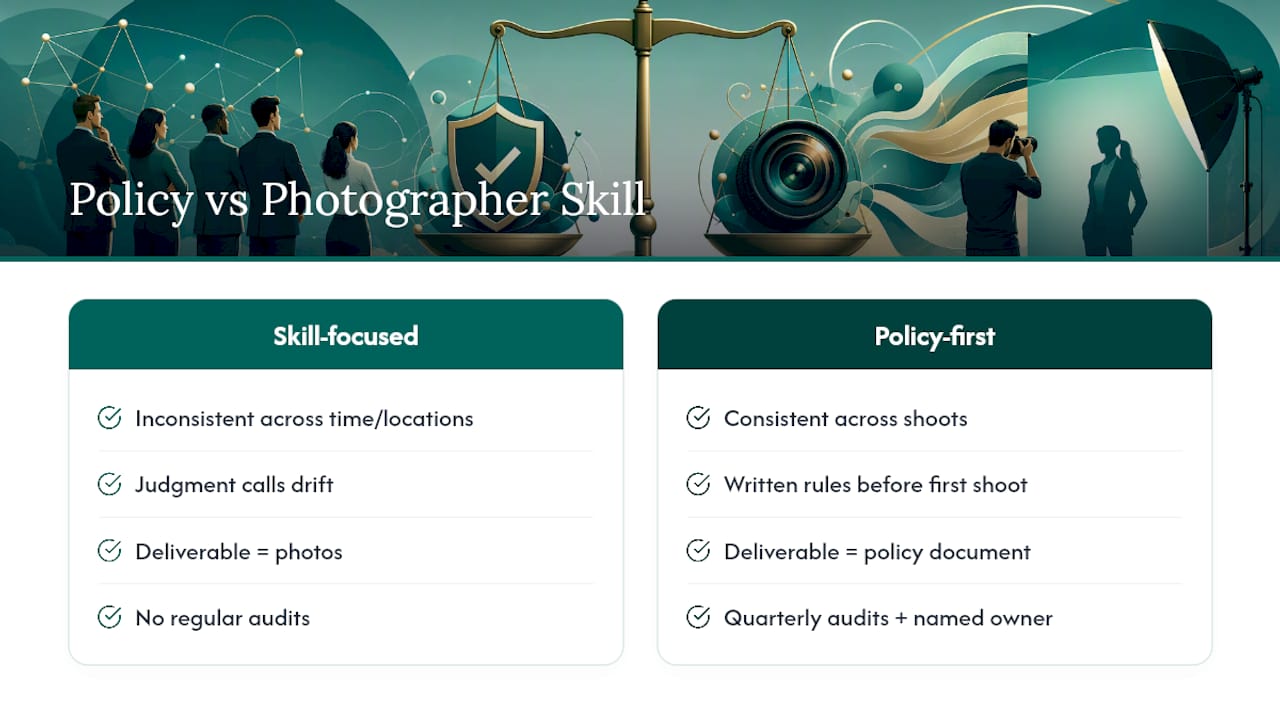
The overlooked piece is auditability. Most programs write a spec once and never check it again, so by year three the “standard” background is actually four slightly different shades of gray depending on who shot which batch. Quarterly audits and a named policy owner catch that before a client or investor does.
If you’re commissioning a program now, prioritize the approval workflow and the retouching limits before you worry about camera equipment. Those two pieces prevent the disputes that actually eat time and budget.
— Kevin
studio2U operationalizes this entire structure instead of leaving you to enforce it alone. Our teams travel with portable studios to your offices nationwide, apply centralized editing so every portrait matches the same written spec, and route approvals through the roles you define, whether that’s a lightweight employee sign-off or a strict executive review chain.

Programs typically produce a consistent leadership gallery, a repeatable onboarding flow for new hires, and an audit-ready asset library that holds up when a rebrand or acquisition forces a refresh. Retouching stays within the limits your policy sets, with change logs available for anything flagged as an exception. If you’re scoping a team or executive headshot program and want a policy template to start from, request a program quote from studio2U and we’ll walk through scoping, timeline, and delivery specs together.
The brand or marketing team typically owns the document, with HR and legal as co-signers on consent and accommodation language.
Consent is required before altering or removing identifying features like scars or tattoos, or making any edit tied to a reconstructive or medical change.
Yes. AI or remote capture pipelines still need the same documented visual spec and approval workflow, or you’ll get visual drift between AI-generated and professionally photographed portraits.
Audit quarterly for visual drift and outdated photos, and run a full refresh whenever the company rebrands.
Yes, studio2U offers customizable policy templates and program scoping support for companies building a headshot program from scratch.
